Announcing the EarningsCall Live Streaming API
Earnings calls are where the useful nuance lives: tone, hesitation, confidence, the “we’ll follow up offline,” and the unscripted Q&A. The problem is that live audio is usually locked inside webcast players, expiring links, and inconsistent vendor setups.
EarningsCall exists to make earnings call data easier to access and build on. Whether you’re listening casually, doing research, or building a product. Today, EarningsCall offers a consumer experience for listening + transcripts, and an API that provides structured access to earnings call data across 9,000+ companies, including transcripts in JSON and raw audio downloads.
Now we’re adding a missing piece:
The new Live Streaming API
The Live Streaming API gives you a clean way to discover live earnings call events and stream them using a standard HLS URL (.m3u8).
If your software can play HLS, it can play EarningsCall live audio.

At a high level:
- Call the API to get live events
- Grab the
streamingUrl - Play it in your player (or ingest it into your pipeline)
Quick demo
curl 'https://prod.earningscall.dev/live-events?apikey=demo' | jqExample response:
{
  "events": [
    {
      "exchange": "NASDAQ",
      "symbol": "AAPL",
      "year": 2024,
      "quarter": 4,
      "companyName": "Apple Inc.",
      "eventDate": "2024-11-01T17:00:00Z",
      "streamingUrl": "https://earningscall.biz/live-demo/dynamic-playlist/playlist.m3u8"
    }
  ],
  "count": 1
}
That streamingUrl is an HLS playlist (.m3u8). The Live Player example repo shows this exact endpoint and response shape.
Play it instantly in VLC
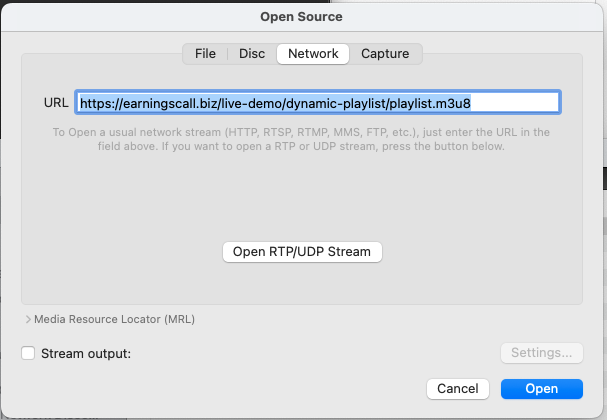
If you want the fastest “does this work?” check:
- Open VLC
- File → Open Network…
- Paste the streamingUrl (the .m3u8)
- Click Open
This is the same workflow shown in our demo setup: a normal network stream URL, nothing proprietary.
Why HLS?
HLS is boring—in the best way.
- It runs over plain HTTPS (friendly to firewalls/CDNs)
- It’s supported nearly everywhere (native on Safari; HLS.js for most other browsers)
- It handles “live” gracefully via continually-updating playlists
- It’s easy to integrate into recording/transcription pipelines
So instead of fighting webcast embed codes, you get a durable streaming primitive: a URL.
What you get back per event
Each event includes:
- exchange, symbol — market identity
- year, quarter — which period the call maps to
- companyName — human-friendly
- eventDate — start time (UTC)
- streamingUrl — the live HLS playlist URL
The open-source player demonstrates browsing events, selecting one, and playing the stream end-to-end.
Example web player (open source)
If you’d rather start from a working implementation than build from scratch, we publish an example player:
It’s a React app that demonstrates the full loop:
- Live Event Discovery from the EarningsCall API
- Event selection
- Real-time HLS streaming using HLS.js
- Connection status (Disconnected / Connecting / Connected / Error)
- Automatic error recovery
- Auto-refresh of the event list every 60 seconds
- Basic playback controls
If you’re building a web experience, this repo is meant to be copied: keep the networking + player logic, swap in your UI and auth.
What this unlocks (real use cases)
This is where it gets fun. Once “live audio” becomes an API response instead of a manual webcast hunt, you can build things that were previously brittle or expensive to operate:
1) A live earnings dashboard
A “what’s live right now” panel for your team or your customers—click to listen, link to the transcript, annotate moments in real time.
2) Real-time transcription + highlights
Use the stream as your ingestion source for STT, then produce:
- live notes
- Q&A only summaries
- speaker based segments
- alerts when certain topics come up
3) Monitoring, alerts, and automation
Polling /live-events is simple. From there:
- notify analysts when followed tickers go live
- kick off internal recording jobs
- auto-create research tickets for post-call review
4) Research-grade archival
If you need reliable capture for compliance or historical analysis, standardized streaming makes the data pipeline far more dependable than “whatever the webcast vendor did this quarter.”
How this fits into EarningsCall (the bigger picture)
EarningsCall is building a complete stack for earnings call access:
- Consumer app + website for listening and following along with transcripts
- API for programmatic access to earnings call dates, transcripts, and raw audio files
- And now: Live streaming so you can treat a live call like any other stream input to your product
The Live Streaming API is designed to be the clean bridge between “the call is happening” and “your system is listening.”
Looking for post-call transcripts?
The Live Streaming API handles the call as it happens. Once it ends, the full structured transcript is available through the EarningsCall Transcripts API — covering 9,000+ companies in JSON format with speaker attribution, prepared remarks, and Q&A sections. Together, live streaming and transcript access give you complete coverage of every earnings call from start to finish.