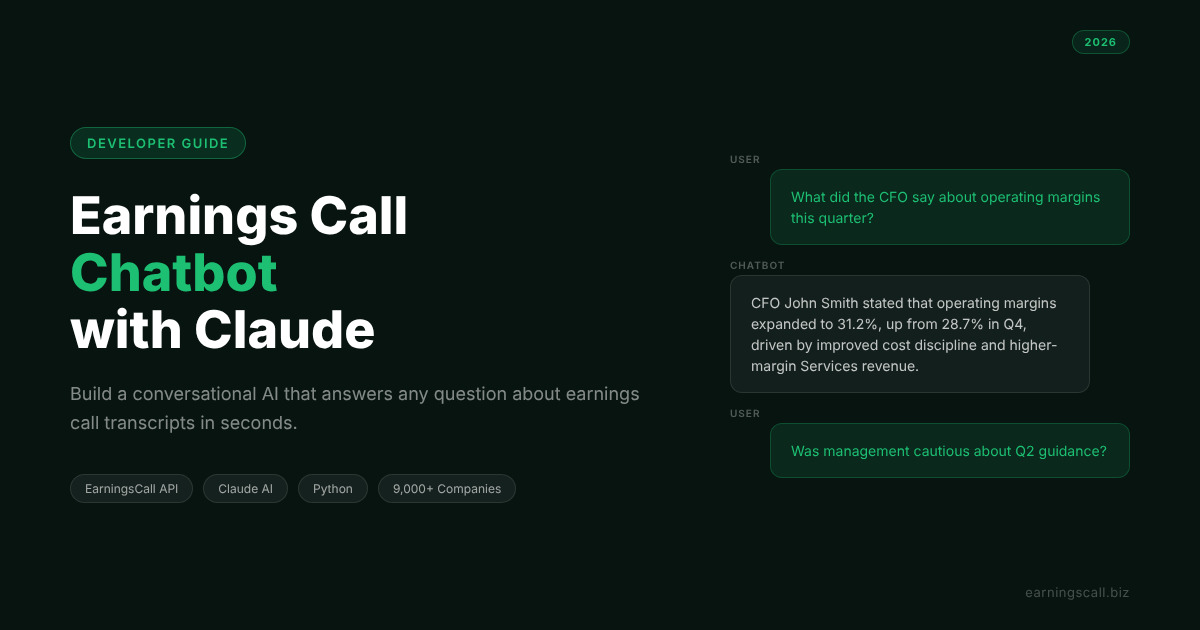
How to Build an Earnings Call Chatbot with Claude and EarningsCall API
Reading a full earnings call transcript takes 30 to 45 minutes. Most of the time, a developer or analyst only needs the answer to one or two specific questions: what did management say about margins, what is the guidance for next quarter, did any analyst ask about customer churn. An earnings call chatbot powered by Claude can answer those questions in seconds by combining structured transcript data from the EarningsCall API with Claude's conversational reasoning.
This guide walks through how to build a working financial chatbot API integration that lets users ask natural language questions about any earnings call and get accurate, sourced answers. The architecture is simple, the code is minimal, and the result is genuinely useful.
What an Earnings Call Chatbot Can Do
A well-built earnings call chatbot does something that search and keyword filtering cannot: it understands the intent behind a question and finds the relevant answer in a large block of unstructured text, even when the exact words in the question do not appear in the transcript.
A user asking "did management sound worried about the economy" is not searching for the word "worried." They are looking for hedging language, cautious guidance, or defensive Q&A responses. Claude understands that intent and extracts the relevant content from the transcript to construct a direct answer.
The types of questions an earnings call chatbot handles naturally include revenue and earnings highlights, forward guidance and management outlook, specific analyst questions and the management responses, tone and language analysis, comparisons to prior quarters, and risk factors mentioned during the call.
None of these require keyword matching. They require understanding — which is exactly what Claude provides when given the transcript as context.
The Two Components
The financial chatbot API architecture combines two data sources.
The EarningsCall API provides structured transcript data for 9,000+ public companies. At level 4 access, it returns prepared remarks and Q&A as separate objects with speaker attribution. This structured input is significantly better than raw transcript text for chatbot use because it allows the chatbot to distinguish between what management said proactively versus what they said in response to analyst pressure.
The Claude API provides the conversational reasoning layer. Given a transcript and a user question, Claude reads the full context and constructs an accurate, cited answer in natural language. Because Claude is processing the actual transcript text rather than a pre-computed index, it handles novel questions without any training or fine-tuning.
Building the Earnings Call Chatbot Architecture
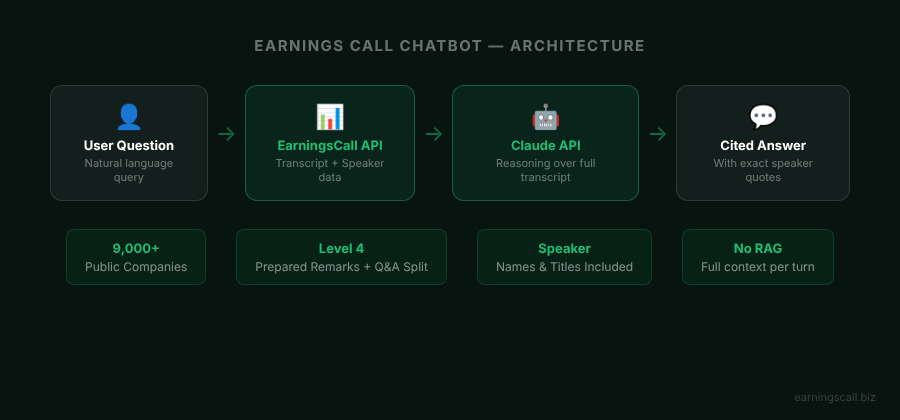
The chatbot runs as a simple loop: fetch the transcript once, then send the transcript plus each user question to Claude and return the response.
Start with installation:
pip install earningscall anthropic
Set up both API clients:
import earningscall
from earningscall import get_company
from anthropic import Anthropic

earningscall.api_key = "YOUR-EARNINGSCALL-API-KEY"
anthropic_client = Anthropic(api_key="YOUR-ANTHROPIC-API-KEY")
Fetch the transcript at level 4 to get separated prepared remarks and Q&A:
company = get_company("aapl")
transcript = company.get_transcript(year=2026, quarter=1)

prepared_text = "\n".join([
    f"{s.speaker_info.name} ({s.speaker_info.title}): {s.text}"
    for s in transcript.prepared_remarks
])

qa_text = "\n".join([
    f"{s.speaker_info.name} ({s.speaker_info.title}): {s.text}"
    for s in transcript.questions_and_answers
])

full_context = f"PREPARED REMARKS:\n{prepared_text}\n\nQ&A SESSION:\n{qa_text}"
Including speaker names and titles in the context string gives Claude the information it needs to answer questions like "what did the CFO say about margins" accurately.
Now build the chat function:
def ask_chatbot(question, transcript_context, chat_history):
    messages = chat_history + [
        {"role": "user", "content": question}
    ]

    system_prompt = f"""You are a financial research assistant with access to the following earnings call transcript.

TRANSCRIPT:
{transcript_context}

Answer questions accurately based only on what is in the transcript.
When quoting management, use their exact words.
If something is not in the transcript, say so clearly."""

    response = anthropic_client.messages.create(
        model="claude-haiku-5-5",
        max_tokens=1024,
        system=system_prompt,
        messages=messages
    )

    return response.content[0].text
The system prompt passes the full transcript as context on every call. This is the simplest and most reliable approach for a single-company chatbot. Claude reads the full context each time and produces an accurate answer without needing a vector database or retrieval layer.
Running the Chatbot
With the fetch and chat functions in place, the main loop is straightforward:
chat_history = []

print(f"Earnings Call Chatbot — {company.company_name} Q1 2026")
print("Type your question or 'quit' to exit.\n")

while True:
    question = input("You: ").strip()
    if question.lower() == "quit":
        break

    answer = ask_chatbot(question, full_context, chat_history)
    print(f"\nAssistant: {answer}\n")

    chat_history.append({"role": "user", "content": question})
    chat_history.append({"role": "assistant", "content": answer})
The chat_history list maintains conversation memory across turns, which means follow-up questions work naturally. After answering "what was the revenue guidance?", the chatbot handles "how does that compare to last quarter?" correctly because the prior exchange is in the message history.
Example Conversations
The chatbot handles a wide range of question types naturally.
Factual questions like "What revenue did management guide for Q2?" receive a specific answer citing the exact guidance language used in prepared remarks.
Analytical questions like "Did management sound confident about international growth?" receive an analysis of the specific language used around international markets across both prepared remarks and Q&A.
Comparative questions like "Was the tone in Q&A more cautious than the prepared remarks?" receive a comparison of the two sections, noting where management's language shifted under analyst questioning.
Specific exchange retrieval like "What did analysts ask about margins and what did the CFO say?" retrieves the specific Q&A exchange with direct quotes from the relevant speaker.
Research published through the National Bureau of Economic Research has documented that earnings call language carries forward-looking information beyond the numerical disclosures in the same communication. The earnings call chatbot makes that information accessible through natural conversation rather than requiring the analyst to read the full transcript themselves.
Scaling the Financial Chatbot API
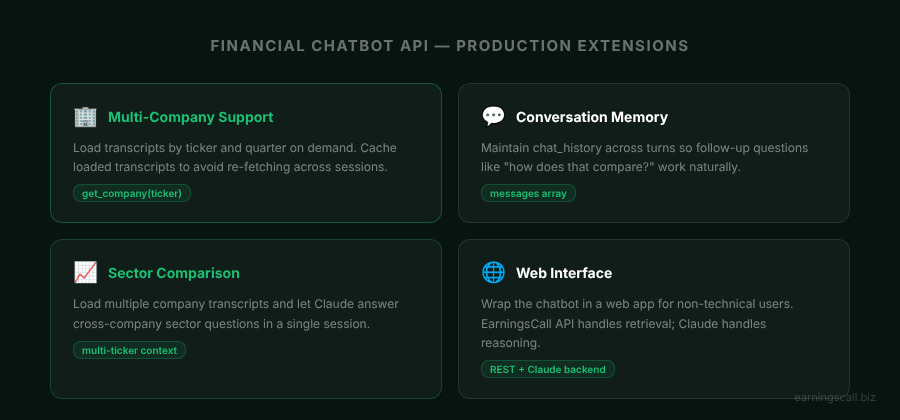
The single-company chatbot described above is a working starting point. Four extensions make it production-ready.
Multi-company support adds a company selection step before the conversation begins. The user specifies a ticker and quarter, the chatbot fetches the relevant transcript, and the conversation proceeds. A dictionary maps loaded transcripts so frequently accessed companies are not re-fetched on every session start:
loaded_transcripts = {}

def get_transcript_context(ticker, year, quarter):
    key = f"{ticker}-{year}-Q{quarter}"
    if key not in loaded_transcripts:
        company = get_company(ticker)
        transcript = company.get_transcript(year=year, quarter=quarter)
        loaded_transcripts[key] = build_context(transcript)
    return loaded_transcripts[key]
Sector comparison extends the chatbot to answer cross-company questions by loading multiple transcripts and allowing the question to span them. "Which companies in the financial sector mentioned rising credit costs this quarter?" becomes answerable once the sector's transcripts are loaded into context.
Web interface deployment wraps the chatbot in a simple web application so non-technical users can interact with it through a browser. The EarningsCall Transcripts API handles transcript retrieval on the backend while the frontend presents a standard chat interface.
Calendar-triggered updates use the EarningsCall calendar endpoint to detect when a new transcript is available for any company in the chatbot's coverage universe, automatically loading it so users can immediately ask questions about the latest call without manual intervention.
For developers who want to understand the full EarningsCall API structure before building the chatbot, Getting Started with EarningsCall API covers access levels, authentication, and the transcript object structure in detail.
Production Considerations
Three things matter most when moving the earnings call chatbot to production.
Context window management becomes relevant for very long transcripts. Most earnings call transcripts fit comfortably within Claude's context window, but transcripts for large companies with extended Q&A sessions can be long. If context length becomes a concern, splitting prepared remarks and Q&A into separate requests and combining the results produces a clean solution without requiring a retrieval architecture.
Response latency is manageable. Claude Haiku 5.5 is optimised for speed and produces responses in one to two seconds for typical transcript questions, which is acceptable for an interactive chatbot. For batch processing or background analysis, the same architecture works with higher-capability models where response depth matters more than latency.
Cost at scale is predictable. Each chatbot turn sends the full transcript as context plus the conversation history. For a typical earnings call transcript and a ten-turn conversation, the per-session token count is manageable. The EarningsCall API adds a flat subscription cost on top of Claude API usage, making the total cost of the financial chatbot API stack predictable and budgetable. Full plan details are available on the EarningsCall pricing page.
FAQ
What is an earnings call chatbot?
An earnings call chatbot is a conversational AI tool that answers natural language questions about earnings call transcripts. It combines structured transcript data from an earnings call API with a large language model like Claude to let users query specific information from calls without reading the full transcript manually.
Does the chatbot require a vector database or RAG setup?
For single-company chatbots, no. Claude's context window is large enough to hold a full earnings call transcript, which means the entire transcript can be passed as context on each turn. A retrieval architecture becomes useful when the chatbot needs to search across transcripts from many companies simultaneously.
How accurate are the chatbot's answers?
Accuracy depends on the quality of the transcript data and the specificity of the question. With clean, speaker-attributed transcript data from the EarningsCall API and a well-constructed system prompt, Claude produces highly accurate answers for factual questions. For analytical or interpretive questions, the accuracy is high but users should treat responses as a starting point for further review rather than a definitive conclusion.
Can the chatbot handle follow-up questions?
Yes. The conversation history is maintained across turns in the messages array, which means follow-up questions referencing previous answers work naturally. "How does that compare to last quarter?" after a guidance question produces an accurate comparison.
Which Claude model should I use for an earnings call chatbot?
Claude Haiku 5.5 is the recommended starting point for speed and cost efficiency. For more nuanced analytical questions where response depth matters more than latency, Claude Sonnet 5.5 produces richer analysis. Both are accessible through the standard Anthropic API.
Conclusion
An earnings call chatbot built on the EarningsCall API and Claude combines structured transcript data with conversational AI to make earnings call content instantly queryable. The architecture is straightforward: fetch the transcript once, pass it as context with each user question, and return Claude's response. The result is a financial chatbot API integration that handles the full range of analyst questions without keyword matching, custom training, or a retrieval infrastructure.
The EarningsCall API covers 9,000+ companies and returns speaker-attributed, section-separated transcript data that Claude can reason over accurately. The chatbot described in this guide is a working starting point that extends naturally to multi-company support, sector comparison, and web deployment as the use case grows.
For full API documentation and integration guides, visit the EarningsCall developer guide. For company filings and supplemental financial data, SEC EDGAR is the primary public resource.