Getting Started with EarningsCall API — A Step-by-Step Integration Guide
Earnings call transcripts are one of the most information-rich recurring datasets in public financial markets. Every quarter, thousands of public companies produce structured, attributable, official communication about their performance and forward outlook. For developers building financial tools, this data is a foundational input. The EarningsCall API makes it programmatically accessible through a Python SDK and JavaScript SDK, with a consistent structure that works the same way whether you are fetching one transcript or running a batch across thousands of companies.
This earnings call API tutorial walks through everything a developer needs to go from zero to a working financial API integration: installation, authentication, fetching your first transcript, understanding the data structure at each access level, and building the patterns that scale to a production system.
What the EarningsCall API Provides
Before writing any code, it is worth understanding what the API returns and why the data is structured the way it is.
The EarningsCall API provides programmatic access to earnings call transcripts for 9,000+ public companies. Each transcript is the official text record of what was said during a company's quarterly earnings call, including the prepared remarks delivered by management at the start of the call and the Q&A session that follows. These are not summaries or paraphrased records. They are the full text of the call, structured by speaker and section.
The API also provides a calendar endpoint that returns upcoming and recent conference dates, company metadata, and transcript availability status for any company in the coverage universe. This makes it possible to build monitoring systems that detect new transcripts automatically rather than polling on a fixed schedule.
Research published through the National Bureau of Economic Research has documented that earnings call language carries forward-looking information beyond what appears in contemporaneous numerical disclosures. For developers building financial intelligence tools, that makes transcript data one of the highest-value recurring datasets available through a structured API.
What You Need Before Starting Your Earnings Call API Tutorial
This earnings call API tutorial requires Python 3.7 or later. The SDK is available on PyPI and installs with a single command. You will also need an EarningsCall API key, available from the EarningsCall platform, to unlock access beyond the default trial universe.
The default installation without an API key gives access to two companies: Apple Inc. and Microsoft. This is sufficient to work through the full tutorial and validate that the SDK is installed and functioning correctly before you set up a key.
Your First Financial API Integration: Installation and Setup
Install the SDK using pip:
pip install --upgrade earningscall
Once installed, import the SDK and set your API key. The key should be stored as an environment variable in production rather than hardcoded in your source:
import earningscall

earningscall.api_key = "YOUR-API-KEY"
With the key set, every subsequent call in the same Python process will use it automatically. The SDK handles authentication, retry logic, and rate limiting internally, so your application code does not need to manage these concerns directly.
To verify the installation is working, fetch a company object:
from earningscall import get_company

company = get_company("aapl")
print(company.company_name)
If this returns "Apple Inc." without errors, your financial API integration is ready to proceed.
Fetching Your First Transcript: Earnings Call API Tutorial
The core call in any earnings call API tutorial is the transcript fetch. The get_transcript method takes a year and quarter and returns a structured transcript object:
from earningscall import get_company

company = get_company("aapl")
transcript = company.get_transcript(year=2026, quarter=1)

print(transcript)
The year and quarter parameters refer to the fiscal reporting period, not the calendar date of the call. Q1 2026 is the earnings call discussing results for the first quarter of fiscal year 2026.
If a transcript is not available for the requested period, the method returns None. Building a null check into your ingestion logic before accessing any transcript attributes is worth doing from the start:
transcript = company.get_transcript(year=2026, quarter=1)
if transcript:
    print(f"Transcript retrieved for {company.company_name}")
else:
    print("Transcript not available for this period")
Understanding the Financial API Integration Data Structure
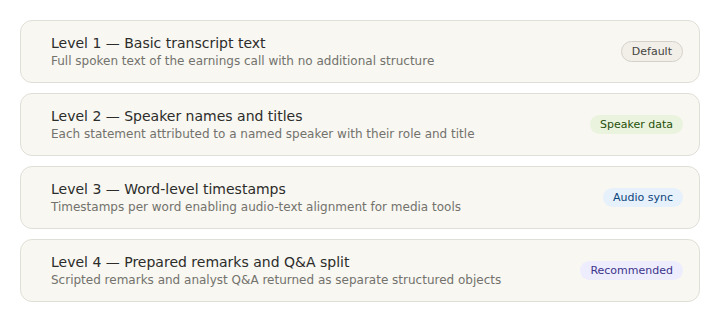
The transcript object behaves differently depending on the access level you specify. The level parameter controls how much structure the returned object contains. Understanding these levels is the most important part of any financial API integration with the EarningsCall API.
transcript = company.get_transcript(year=2026, quarter=1)
At the default level, the transcript contains the basic text of the call. At level 2, speaker names and titles are included alongside each statement, making it possible to filter by speaker role:
transcript = company.get_transcript(year=2026, quarter=1)
At level 3, word-level timestamps are included alongside the text. This enables audio-text alignment for developers building tools that sync transcript text with the earnings call audio file.
At level 4, the transcript object separates the call into two distinct sections: prepared_remarks and questions_and_answers. This is the access level most relevant for analytical workflows because the two sections carry different informational content. Prepared remarks contain the scripted management narrative and forward guidance. Q&A contains the unscripted exchanges between management and analysts.
from earningscall import get_company

company = get_company("aapl")
transcript = company.get_transcript(year=2026, quarter=1)

prepared = transcript.prepared_remarks
qa = transcript.questions_and_answers
For most earnings call API tutorial projects, level 4 is the recommended starting point because it provides the cleanest structure for both summarisation and NLP analysis workflows.
Using the Calendar Endpoint
The calendar endpoint is the mechanism that makes automated transcript monitoring possible. It returns upcoming and recent conference events for any date, including the transcript_ready field that confirms whether a transcript is already available for each event:
from earningscall import get_calendar
from datetime import date

calendar = get_calendar(date(2026, 5, 1))
The calendar object returned contains conference dates, company names, ticker symbols, and transcript availability status. A monitoring system polls this endpoint on a schedule, filters for companies in its watchlist, and triggers a transcript fetch the moment transcript_ready is confirmed true.
This pattern, poll calendar, check transcript_ready, fetch transcript, is the foundation of any production financial API integration that needs to respond quickly to new transcript availability rather than running on a fixed monthly or quarterly batch.
Building a Coverage Universe
For applications that need to monitor a broad set of companies, the SDK includes get_sp500_companies(), which returns the full S&P 500 list with company metadata:
from earningscall import get_sp500_companies

for company in get_sp500_companies():
    print(company.ticker_symbol, company.company_name)
This is the most convenient starting point for a coverage universe because it provides a well-defined, broadly relevant set of companies without requiring manual list management. For coverage outside the S&P 500, companies are accessible by ticker symbol through get_company() for any of the 9,000+ companies in the EarningsCall universe.
For a broader view of what different types of applications build on top of this coverage infrastructure, explore the full EarningsCall API — covering coverage, access levels, pricing, and SDK options.
Scaling Your Earnings Call API Tutorial to Production
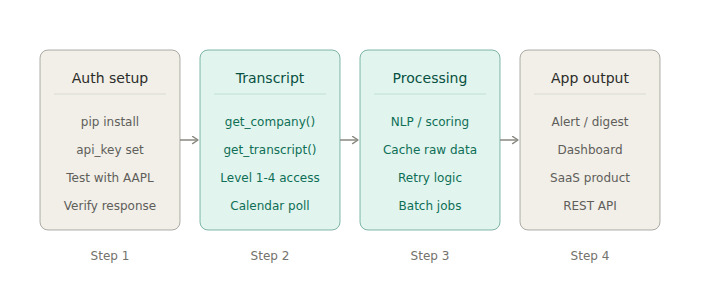
Three patterns matter most when moving from a working tutorial to a production financial API integration.
The first is retry configuration. The SDK includes built-in retry logic with exponential backoff. Configure it explicitly in production applications to handle transient failures without manual intervention:
import earningscall

earningscall.api_key = "YOUR-API-KEY"
earningscall.retry_strategy = earningscall.RetryStrategy(
    strategy="exponential",
    base_delay=3,
    max_attempts=5
)
The retry delays follow the sequence 3, 6, 12, 24, and 48 seconds, providing robust coverage for the brief periods of elevated load that occur during peak earnings reporting windows.
The second is caching. Raw transcript objects retrieved from the API should be written to a local cache immediately on retrieval. Any subsequent processing, NLP scoring, summarisation, signal extraction, reads from the cache rather than re-fetching from the API. This decouples your processing pipeline from the data retrieval layer and reduces API call volume significantly in applications that re-process the same transcripts multiple times.
The third is separation of concerns. Keep the calendar polling, transcript fetching, and data processing stages as independent deployable units. This makes it straightforward to update the processing logic, for example to improve an NLP model or add a new signal type, without touching the data retrieval infrastructure.
For developers building a complete financial intelligence application on top of this foundation, Building Financial Intelligence Tools with Earnings Call Data covers the full pipeline architecture including NLP integration, database design, and serving layer options.
What to Build Once You Are Integrated
Once you have a working earnings call API tutorial integration, the data foundation supports a wide range of application types.
The simplest is an earnings alert system: poll the calendar for a watchlist of companies and send a notification when a new transcript becomes available. This requires the calendar endpoint, a list of tickers, and a notification channel. It is the fastest path from a working integration to a useful production tool.
From there, the natural next step is adding an NLP processing layer that scores each transcript for sentiment, hedging language, or forward-looking content. The prepared remarks and Q&A sections at level 4 access provide the structured input that NLP models need to produce reliable, auditable signals.
More sophisticated applications include multi-company research automation tools, CEO language pattern trackers, and sector-level intelligence dashboards. Each of these builds on the same underlying transcript data and calendar infrastructure, adding analytical layers on top rather than requiring different data inputs.
For developers interested in building a commercial product on this infrastructure, How to Build and Launch an Earnings Intelligence SaaS with EarningsCall API covers product architecture, packaging, and go-to-market for earnings intelligence products built on the EarningsCall data layer.
FAQ
How do I install the EarningsCall Python SDK?
Run pip install --upgrade earningscall in your Python environment. The package is available on PyPI and requires Python 3.7 or later. After installation, set your API key with earningscall.api_key = "YOUR-KEY" before making any API calls.
What companies can I access with the EarningsCall API?
By default, without an API key, the SDK grants access to Apple Inc. and Microsoft for testing. With an API key, access extends to 9,000+ public companies. The get_sp500_companies() function returns the full S&P 500 list as a starting point for broad coverage.
What is the difference between transcript access levels?
Level 1 returns basic transcript text. Level 2 adds speaker names and titles. Level 3 adds word-level timestamps for audio alignment. Level 4 returns the transcript as separate prepared_remarks and questions_and_answers objects alongside speaker data. Level 4 is recommended for most analytical and NLP applications.
How do I know when a new transcript is available?
Use the get_calendar() function with a target date. The returned calendar object includes a transcript_ready field for each scheduled company. Poll this endpoint on a schedule and trigger a transcript fetch when transcript_ready becomes true for any company in your watchlist.
Does the SDK handle rate limiting automatically?
Yes. The SDK includes configurable retry logic with exponential backoff. Configure the retry_strategy parameter explicitly in production applications to ensure reliable behaviour during high-volume periods such as peak earnings reporting weeks.
Is the EarningsCall API available in JavaScript?
Yes. EarningsCall provides a JavaScript SDK with TypeScript support alongside the Python SDK. Both SDKs cover transcript retrieval, calendar access, and company lookup through the same underlying endpoints.
Conclusion
This earnings call API tutorial covers everything needed to go from a fresh Python environment to a working financial API integration: installation, authentication, transcript fetching at multiple access levels, calendar-based monitoring, and the production patterns that scale reliably. The EarningsCall SDK handles the data sourcing complexity, leaving the application development effort for the analytical layers and user-facing features where the product's value is built.
The GitHub repository at github.com/EarningsCall/earningscall-python contains the full README with additional examples, SDK configuration options, and the complete method reference.
For full API documentation and SDK integration guides, visit the EarningsCall developer guide. For company filings and supplemental financial data, SEC EDGAR is the primary public resource.