How to Integrate the EarningsCall Live Streaming API: A Developer Guide
Live earnings call audio has always been one of the most useful data sources in financial markets and one of the hardest to access programmatically. Webcast players, expiring links, and inconsistent vendor setups have made it difficult to treat a live earnings call the way you would treat any other data stream. The EarningsCall live streaming API earnings calls integration changes that by returning a standard HLS URL for any live event, which any HLS-compatible player or pipeline can consume immediately.
This guide covers everything a developer needs to integrate the earnings call live audio API: the endpoint, the response structure, how to play the stream in different environments, the open-source player, and what you can build once live audio becomes a clean API response rather than a manual webcast hunt.
What the Live Streaming API for Earnings Calls Provides
The core concept is simple. Instead of navigating to a webcast page, finding an embed player, and manually monitoring a live event, the live streaming API earnings calls endpoint returns a list of currently live events with a streamingUrl field for each one. That URL is a standard HLS playlist file, .m3u8, which any HLS-compatible player can open directly.
HLS was chosen deliberately because it is the most widely supported live streaming format available. It runs over plain HTTPS, which makes it firewall and CDN friendly. It is natively supported on Safari and available via HLS.js on every other major browser. It handles live content gracefully through continuously updating playlists. And critically for developers building data pipelines, it is easy to ingest into recording and transcription workflows without any proprietary tooling.
The result is that live earnings call audio becomes a durable, portable streaming primitive: a URL that works wherever HLS works.
Getting Started with the Earnings Call Live Audio API
The earnings call live audio API has a single endpoint for discovering live events:
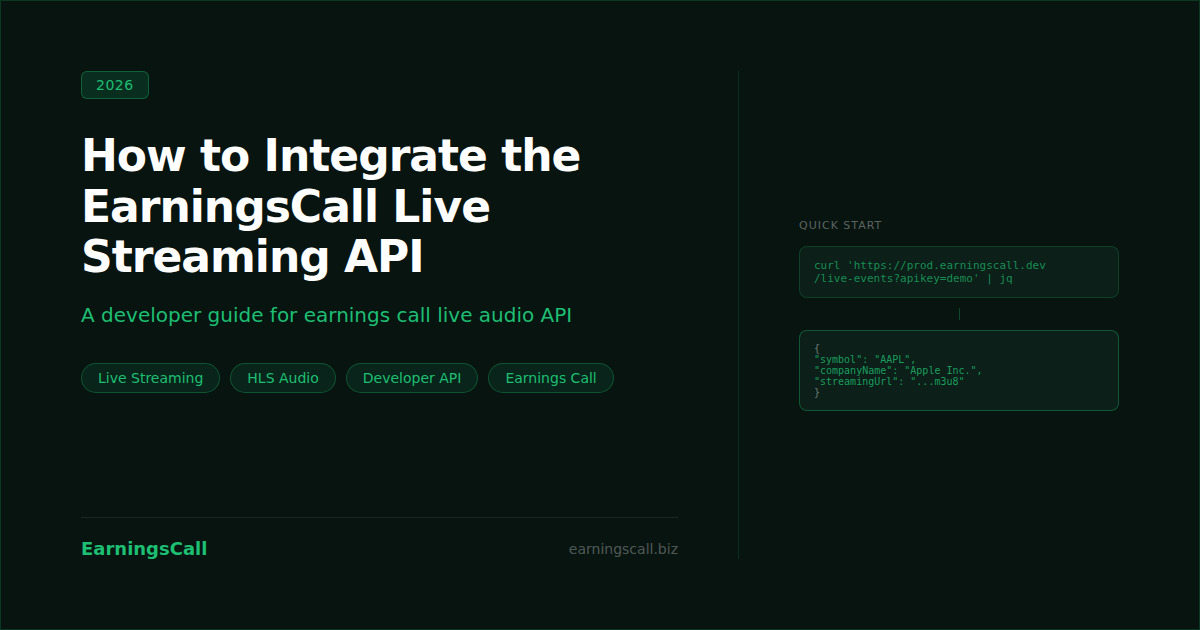
curl 'https://prod.earningscall.dev/live-events?apikey=demo' | jqThis returns a JSON object containing an array of live events and a count. Each event in the array includes the following fields:
{
  "events": [
    {
      "exchange": "NASDAQ",
      "symbol": "AAPL",
      "year": 2024,
      "quarter": 4,
      "companyName": "Apple Inc.",
      "eventDate": "2024-11-01T17:00:00Z",
      "streamingUrl": "https://earningscall.biz/live-demo/dynamic-playlist/playlist.m3u8"
    }
  ],
  "count": 1
}
The streamingUrl is the only field your player or pipeline needs to start consuming the stream. The other fields, exchange, symbol, year, quarter, companyName, and eventDate, provide the metadata needed to identify which company and reporting period the stream corresponds to, route it to the right part of your application, and store it alongside the correct transcript record once the call ends.
The demo API key in the example above gives access to a sample event for testing. Replace it with your production key from the EarningsCall API to access live events across the full coverage universe.
How to Play the Live Streaming API Earnings Calls Stream
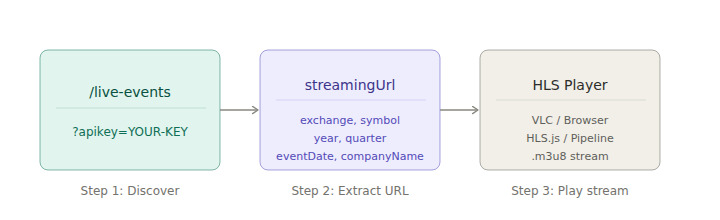
Once you have the streamingUrl, playing the live streaming API earnings calls stream requires nothing more than passing the URL to any HLS-compatible player. Three common integration patterns cover most use cases.
VLC for instant verification. The fastest way to confirm the stream is working is to open VLC, go to File, select Open Network, paste the streamingUrl, and click Open. This is the same workflow shown in the EarningsCall demo setup and requires no code at all. It is useful for testing before building a full integration.
Browser playback with HLS.js. For web applications, HLS.js handles playback on all browsers that do not natively support HLS. The open-source EarningsCall live player at github.com/EarningsCall/live-player demonstrates the complete browser integration: event discovery from the /live-events endpoint, event selection, HLS.js playback, connection status monitoring, automatic error recovery, and auto-refresh of the event list every 60 seconds.
import Hls from 'hls.js';
 const streamingUrl = event.streamingUrl;
const video = document.getElementById('player');
 if (Hls.isSupported()) {
  const hls = new Hls();
  hls.loadSource(streamingUrl);
  hls.attachMedia(video);
}
Pipeline ingestion for transcription or recording. For server-side pipelines that ingest the stream for real-time transcription, archival, or alerting, the .m3u8 URL is passed directly to whichever STT or recording tool the pipeline uses. Because HLS is a standard format, no proprietary client is required.
For developers who are new to the EarningsCall platform and want to understand the broader API structure before integrating live streaming, Getting Started with EarningsCall API covers authentication, SDK setup, and first calls.
The Open-Source Live Player
EarningsCall publishes a complete open-source React application that demonstrates the full earnings call live audio API integration from event discovery to playback. The repository is available at github.com/EarningsCall/live-player and a live demo runs at earningscall.github.io/live-player.
The player handles every part of the integration loop. It calls the /live-events endpoint to discover available streams, presents the event list for selection, initiates HLS playback using HLS.js, monitors connection status across Disconnected, Connecting, Connected, and Error states, recovers automatically from stream errors, and refreshes the event list every 60 seconds to surface new events as they go live.
For developers building a web experience, the repository is designed to be copied rather than referenced. The networking and player logic can be kept as-is while the UI and authentication are replaced to match the target application. This makes it a practical starting point for any web-based live streaming API earnings calls integration rather than a reference implementation that requires translation.
What You Can Build with an Earnings Call Live Audio API
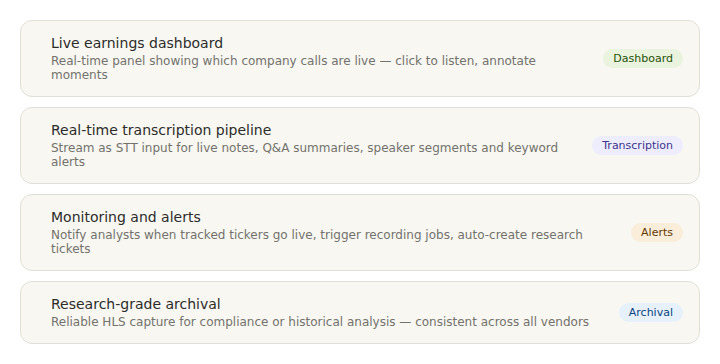
Once live audio becomes a standard API response, several product categories that were previously difficult to build become straightforward.
A live earnings dashboard gives teams or end users a real-time view of which company calls are happening right now, with a single click to start listening. Combined with transcript access, the dashboard can surface live notes alongside the audio stream, giving users a synchronized listening and reading experience. Polling /live-events is the only backend requirement for the discovery layer.
A real-time transcription pipeline uses the stream as the ingestion source for a speech-to-text service. Once the audio is flowing, the transcription layer can produce live notes, Q&A-only summaries, speaker-segmented highlights, or automated alerts when specific topics or keywords appear during the call. Research published through the National Bureau of Economic Research has documented that earnings call language carries forward-looking information that markets respond to in real time, making low-latency access to that language commercially significant.
A monitoring and alerting system polls /live-events on a schedule, detects when a tracked ticker goes live, and triggers downstream actions automatically: notifying analysts, starting a recording job, creating a post-call research ticket, or kicking off a transcription pipeline. This replaces the manual process of monitoring earnings calendars and navigating to webcast pages for each company.
Research-grade archival for compliance or historical analysis benefits from the reliability and standardisation of HLS delivery. Rather than depending on whatever webcast vendor a company uses in a given quarter, the EarningsCall earnings call live audio API provides a consistent streaming format across all covered companies, making the archival pipeline predictable and maintainable.
The Corporate Finance Institute's documentation on earnings calls notes that management commentary during live calls often contains the most market-moving content of the full earnings communication. Building reliable programmatic access to that commentary as it happens is what the live streaming API makes possible.
How Live Streaming Connects to Transcript Access
The live streaming API earnings calls integration covers the call as it is happening. Once the call ends, the full structured transcript becomes available through the EarningsCall Transcripts API, covering 9,000+ companies in JSON format with speaker attribution, prepared remarks, and Q&A sections separated at level 4 access.
The two products are designed to work together. Live streaming handles the real-time layer. The transcripts API handles the post-call structured data layer. Together they provide complete programmatic coverage of every earnings call from the moment it starts to the structured record that feeds downstream analysis.
FAQ
What is the EarningsCall live streaming API?
The EarningsCall live streaming API is an endpoint that returns a list of currently live earnings call events, each with a standard HLS streaming URL. Any player or pipeline that supports HLS can consume the stream directly from the returned URL without navigating to a webcast player or handling proprietary streaming formats.
What format does the live stream use?
The stream is delivered as an HLS playlist file with a .m3u8 extension. HLS runs over plain HTTPS, is supported natively on Safari, and is available via HLS.js on other browsers. It is also compatible with server-side recording and transcription pipelines that accept standard stream URLs.
What fields does the live-events endpoint return?
Each event in the response includes exchange, symbol, year, quarter, companyName, eventDate, and streamingUrl. The streamingUrl is the HLS playlist URL for the live audio stream.
Is there an open-source player I can start from?
Yes. EarningsCall publishes a React application at github.com/EarningsCall/live-player that demonstrates the full integration: event discovery, selection, HLS.js playback, connection status monitoring, automatic error recovery, and event list refresh. It is designed to be copied and customised rather than used as-is.
How does live streaming relate to the EarningsCall transcripts API?
The live streaming API covers the call as it happens. The EarningsCall Transcripts API covers the post-call record, returning structured JSON transcripts with speaker attribution and separated prepared remarks and Q&A sections. The two are designed to be used together for complete earnings call coverage.
Conclusion
The EarningsCall live streaming API earnings calls integration converts live earnings call audio from a manual webcast hunt into a clean API response. The /live-events endpoint returns an HLS URL per event, which any compatible player or pipeline can consume immediately. The earnings call live audio API covers event discovery, stream delivery, and the connection to post-call transcript access through the EarningsCall platform.
For developers building real-time financial tools, the combination of live streaming and structured transcript access provides complete programmatic coverage of every earnings call across 9,000+ public companies, from the moment the call starts to the structured record that feeds downstream analysis and research.
For full API documentation and integration guides, visit the EarningsCall developer guide. For company filings and supplemental financial data, SEC EDGAR is the primary public resource.